

Scoring the Speaking Domain Locally
The Speaking domain is administered one-on-one with the student and TE and is the only domain that is scored locally, in the moment, by the TE. The TE has two options for capturing the student’s scores in the moment. One option is to log on to the DEI before administering the Speaking domain and enter the student’s scores directly into the DEI while administering the assessment. The second option is to use the Speaking Student Score Sheet (figure 1) in the DFA or, for K–2, the Writing Answer Book, which also includes the Speaking Student Score Sheet to record the student’s scores as the assessment is administered. This second option requires the TE to log on to the DEI as soon as possible after the Speaking domain administration has been completed and enter the scores for the student. If this option is used, the Speaking Student Score Sheet should be kept secure until data entry. In the event the TE misplaces the score sheet prior to entering the scores in the DEI and cannot determine the scores from voice capture, the student might require a Reset Appeal to recapture the student’s responses.
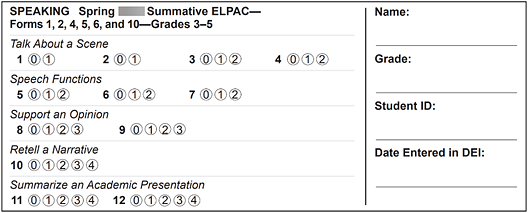
Figure 1. Sample Speaking Student Score Sheet
During the administration of the Speaking domain, the TE should not be concerned about the quality of the voice-capture response but instead should focus on scoring the oral response in the moment. Do not rerecord the student’s response. The Using the DEI chapter of this manual can be used as reference, as it provides the steps that must be followed for entering student Speaking domain scores into the DEI.
Securely destroy the used Speaking Student Score Sheet after a student’s scores have been entered into the DEI.
Audio Capture for the Speaking Domain
During the administration of the Speaking domain, the following guidelines apply to the audio capture tool. The TE should score what the student says, not what is recorded.
Rerecording: If any of the following issues occur, the TE may continue to the next question and does not need to rerecord:
- The TE forgets to record a response.
- The TE records a response on the wrong question.
- There is a red triangle in the review box when ending the test session. If the audio capture times out after two minutes, the TE should allow the student to complete the response and score the complete spoken response and not only what was recorded.
Headsets: Use of headsets with a microphone for voice capture is not recommended by the TE, to enable interaction between the student and TE.