

ELPAC LEA Test Administrations
Unlike CAASPP, ELPAC has a fixed statewide testing window. Because LEAs are unable to alter the ELPAC testing windows, the test administrations will be view only.
Use the [Admins] navigation tab in the top navigation bar (figure 1) to locate the LEA Test Administrations screen to view a list of administration calendars for test administrations that are associated with the LEA for ELPAC.

Figure 1. [Admins] navigation tab
To view the ELPAC administration:
- Select LEA to View Test Administration—Select the LEA for which to view the administration calendar.
- LEA Test Administration(s)—ELPAC Admin Calendar—View the instructional calendar start date and the instructional calendar end date in the Administrations table on the View and Set Up Administrations screen. Select the [View Summary] link to view the summary information for the corresponding administration.
- ELPAC Administration Calendar Summary—View the summary information for the ELPAC administration.
I. Select LEA to View Test Administration
This field is preselected; it is preset to the LEA with which the user is associated. Select the LEA from the Organization drop-down list (figure 2).
- Select the [View] button to move to the View and Set Up Administrations screen to work with a list of ELPAC administration calendars.
- Select the [Clear] button to remove a selected organization from the Organization field.
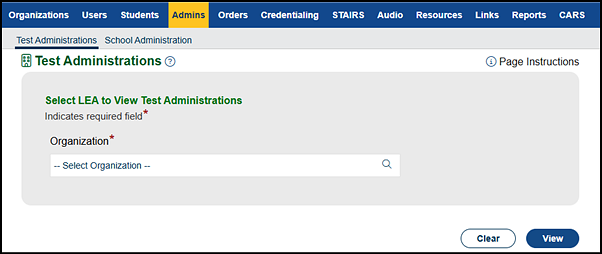
Figure 2. “Select LEA to View Administrations” section of the Test Administrations screen
II. LEA Test Administration(s)—ELPAC Admin Calendar
Use the [Admin Table] tab in the “LEA Test Administration(s)” section of the Calendar screen (figure 3) to view the administration calendar for the ELPAC administration.
Select the [View Summary] link in the Admin Calendar Summary column to view the administration calendar summary for the corresponding test administration. This action takes the user to the Calendar screen.
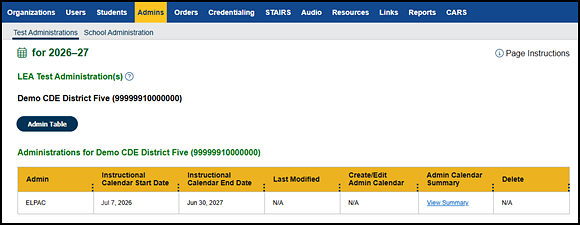
Figure 3. ELPAC Calendar screen—LEA
III. ELPAC Administration Calendar Summary
The Testing Window Summary table for the Initial ELPAC includes important information about the start and end dates for the testing windows, the primary order cutoff dates, and the supplemental order cutoff dates.
- Use the tables (figure 4 and figure 5) to view the test administration calendar summary for the Initial ELPAC, Initial Alternate ELPAC, Summative ELPAC, and Summative Alternate ELPAC.
- For each assessment, the test administration calendar summary is displayed on a separate tab.
- Select the [Admin Table] button to return to the Administrations table.
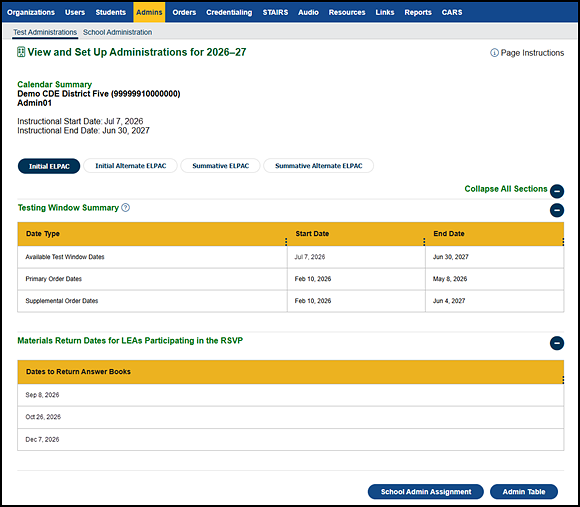
Figure 4. Initial ELPAC Testing Window Summary table—LEA
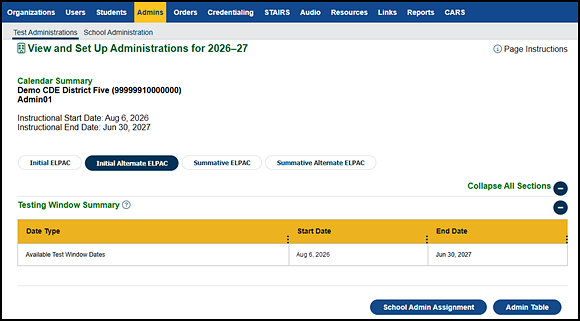
Figure 5. Initial Alternate ELPAC Testing Window Summary table
Table 1 describes the fields displayed in the View and Set Up Administrations screen for ELPAC.
| Name | Description |
|---|---|
|
Admin |
The name of the administration is displayed under the LEA name in the top-left portion of the screen. |
|
Instructional Dates |
The instructional start date and the instructional end date for the school administration year are displayed under the administration. |
|
Testing Window Summary |
Date Type—The name of the type of date:
|
|
RSVP Materials Return Dates |
For each test administration, this section displays the dates the materials (Answer Books) are to be returned. This is applicable only for the Initial ELPAC. |