

Directions for Administration
CAA for Science DFAs
To proctor the CAA for Science, test examiners need to download the DFAs for the science domain embedded performance task according to the form assigned to the organization. Prior to downloading, test examiners should confirm with the site coordinator the form of the assessment assigned to the organization. Site coordinators can confirm the form assignment for their school from the CAA for Science Form Assignments web page.
Take the following steps to view the appropriate CAA for Science DFA and download it as a PDF:
- Select CAA for Science Directions for Administration (DFAs) from the Available Materials drop-down list (figure 1).
- To view the DFA for a particular grade level or the grade band, select the appropriate button.
-
Select a link to download the domain DFA that matches the form assigned to the organization.
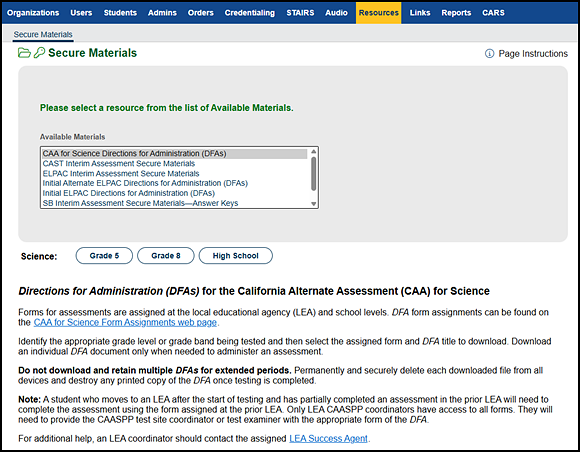
Figure 1. Secure Materials screen—CAA for Science DFA options
CAAs for ELA and Mathematics DFAs
To proctor the CAAs for ELA and mathematics, CAASPP test examiners need to download the DFAs. Prior to downloading, CAASPP test examiners should confirm with the site coordinator the form of the assessment assigned to the organization. Site coordinators can confirm the form assignment for their school from the CAAs for ELA and Mathematics Form Assignments web page.
Take the following steps to view the appropriate CAAs for ELA and Mathematics DFA and download it as a PDF:
-
Select CAAs for ELA and Mathematics DFAs from the Available Materials drop-down list (figure 2).
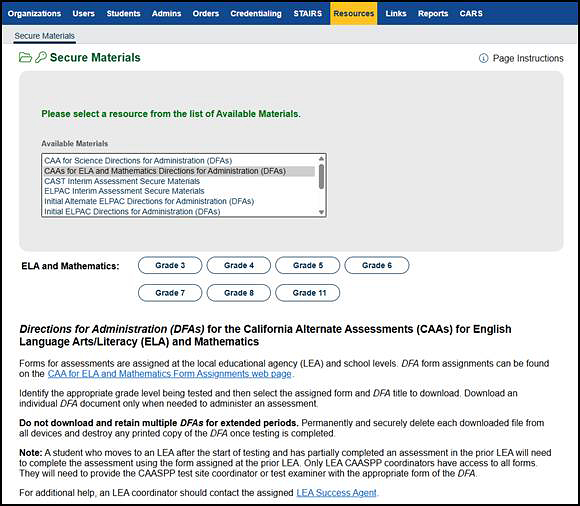
Figure 2. Secure Materials screen—CAAs for ELA and mathematics DFA options
- To view the DFA for a particular grade level, select the appropriate button.
- Select a link to download the appropriate DFA that matches the form assigned to the organization.
Initial ELPAC DFAs
To proctor the Initial ELPAC, test examiners need to download the DFAs.
Take the following steps to view the appropriate Initial ELPAC DFA and download it as a PDF:
-
Select Initial ELPAC Test Directions for Administration (DFAs) from the Available Materials drop-down list (figure 3).
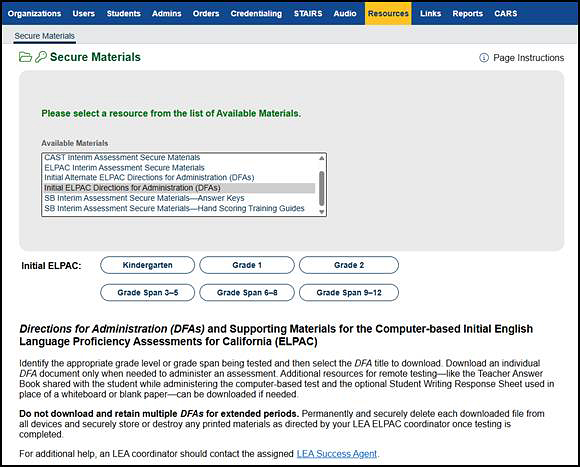
Figure 3. Secure Materials screen—Initial ELPAC DFA options
- To view the DFA for a particular grade level or grade span, select the appropriate button.
- Select a link to download the appropriate DFA or other test administration document.
Summative ELPAC DFAs
To proctor the Summative ELPAC, test examiners need to download the DFAs. Prior to downloading, test examiners should confirm with the site coordinator the form of the assessment assigned to the organization. Site coordinators can confirm the form assignment for their school from the Summative ELPAC Form Assignments web page.
Take the following steps to view the appropriate Summative ELPAC DFA and download it as a PDF:
-
Select Summative ELPAC Test Directions for Administration (DFAs) from the Available Materials drop-down list (figure 4).
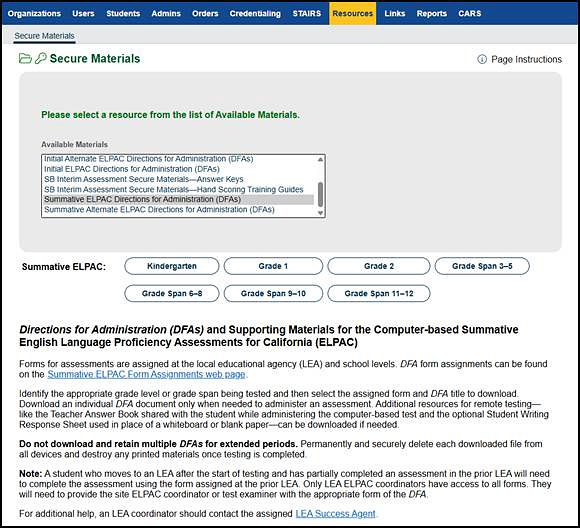
Figure 4. Secure Materials screen—Summative ELPAC DFA options
- To view the DFA for a particular grade level or grade span, select the appropriate button.
- Select a link to download the appropriate DFA or other test administration document that matches the form assigned to the organization.
Initial Alternate ELPAC DFAs
To proctor the Initial Alternate ELPAC, test examiners need to download the DFA.
Take the following steps to view the appropriate Initial Alternate ELPAC DFA or picture cards document and download it as a PDF:
-
Select Initial Alternate ELPAC Directions for Administration (DFAs) from the Available Materials drop-down list (figure 5).
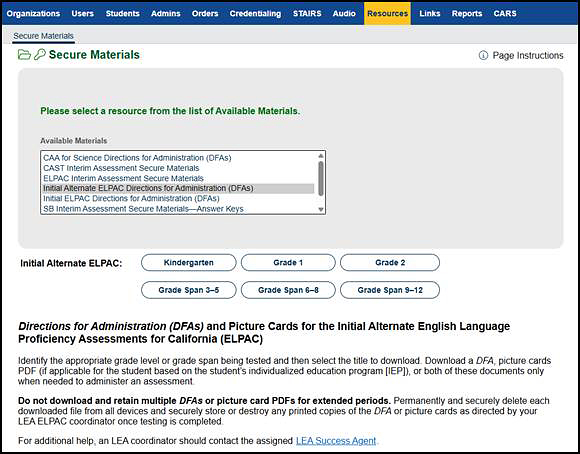
Figure 5. Secure Materials screen—Initial Alternate ELPAC DFA options
- To view the DFA for a particular grade level or grade span, select the appropriate button.
- Select a link to download the appropriate DFA or picture cards document.
Summative Alternate ELPAC DFAs
To proctor the Summative Alternate ELPAC, test examiners need to download the DFAs. Prior to downloading, test examiners should confirm with the site coordinator the form of the assessment assigned to the organization. Site coordinators can confirm the form assignment for their school from the Summative Alternate ELPAC Form Assignments web page.
Take the following steps to view the appropriate Summative Alternate ELPAC DFA or picture cards document and download it as a PDF:
-
Select Summative Alternate ELPAC Directions for Administration (DFAs) from the Available Materials drop-down list (figure 6).
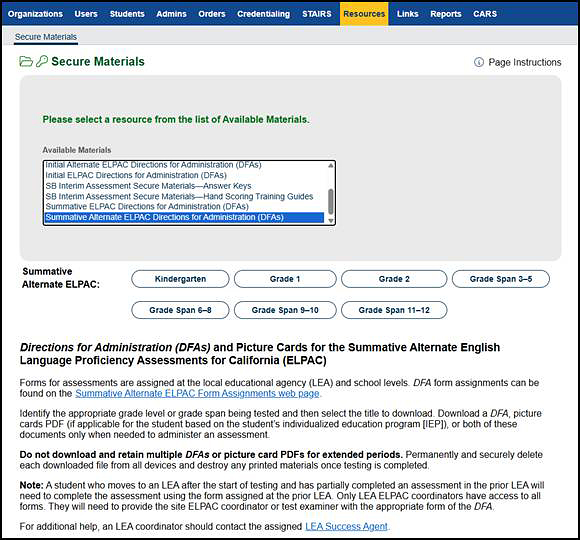
Figure 6. Secure Materials screen—Summative Alternate ELPAC DFA options
- To view the DFAs for a particular grade level or grade span, select the appropriate button.
- Select a link to download the appropriate DFA or picture cards document that matches the form assigned to the organization.